DISPO+ for service, installation and job-based businesses

Operations and job management for sole traders, service companies and growing teams.

When paper, Excel and the phone are no longer enough to manage jobs, chaos and evening administration follow. DISPO+ brings jobs, planning, supporting information and invoicing together, reducing re-entry, searching and the things you need to remember.

14 days the trial includes SOLO and TEAM in one test
15+ areas jobs, scheduling, email, documents, ARES, full-text search and auditing
1 workflow enquiry -> plan -> delivery -> billing -> archive
SOLO and TEAM
Email without complicated configuration
ARES and contacts
Quick search and auditing
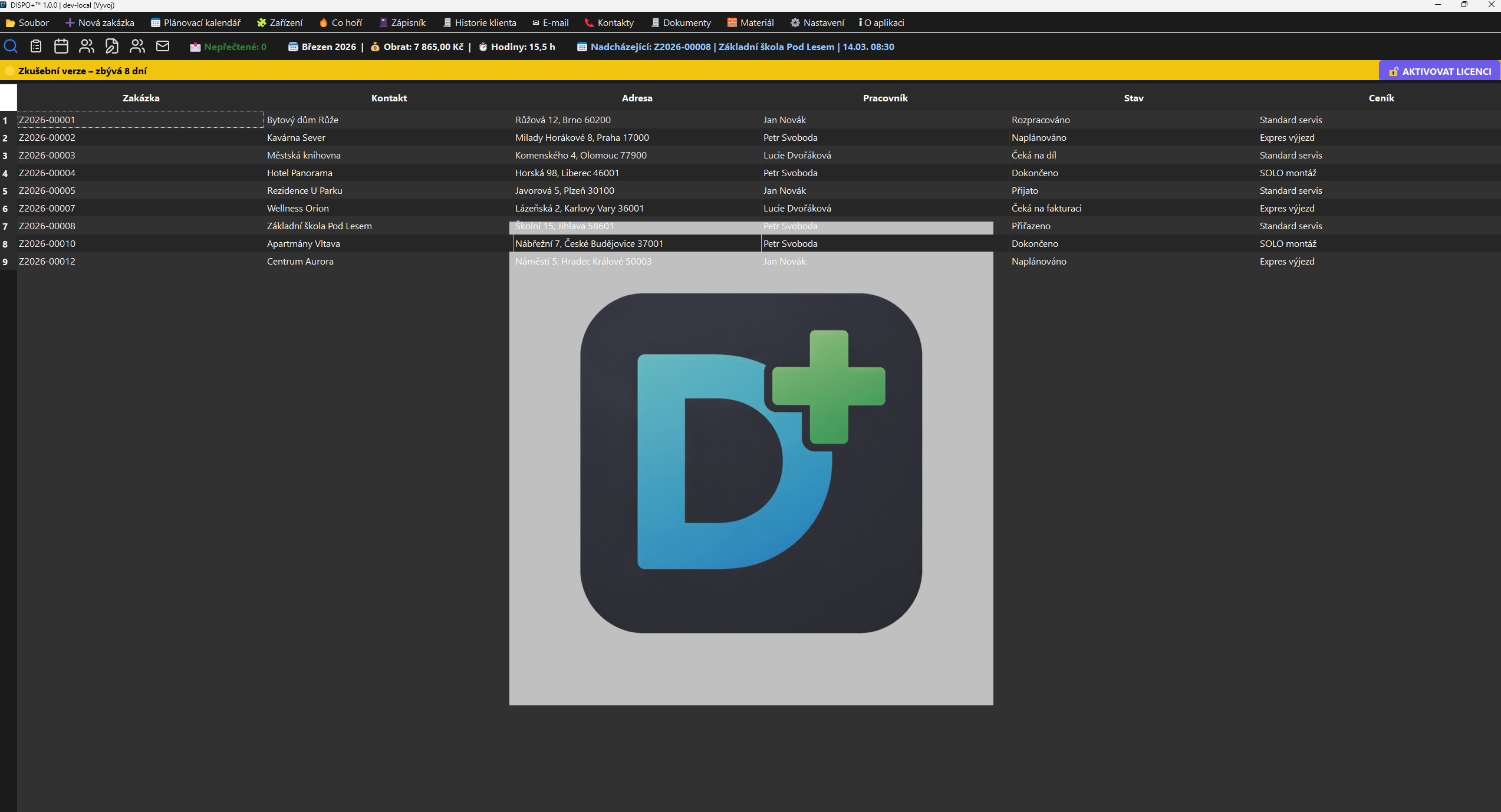
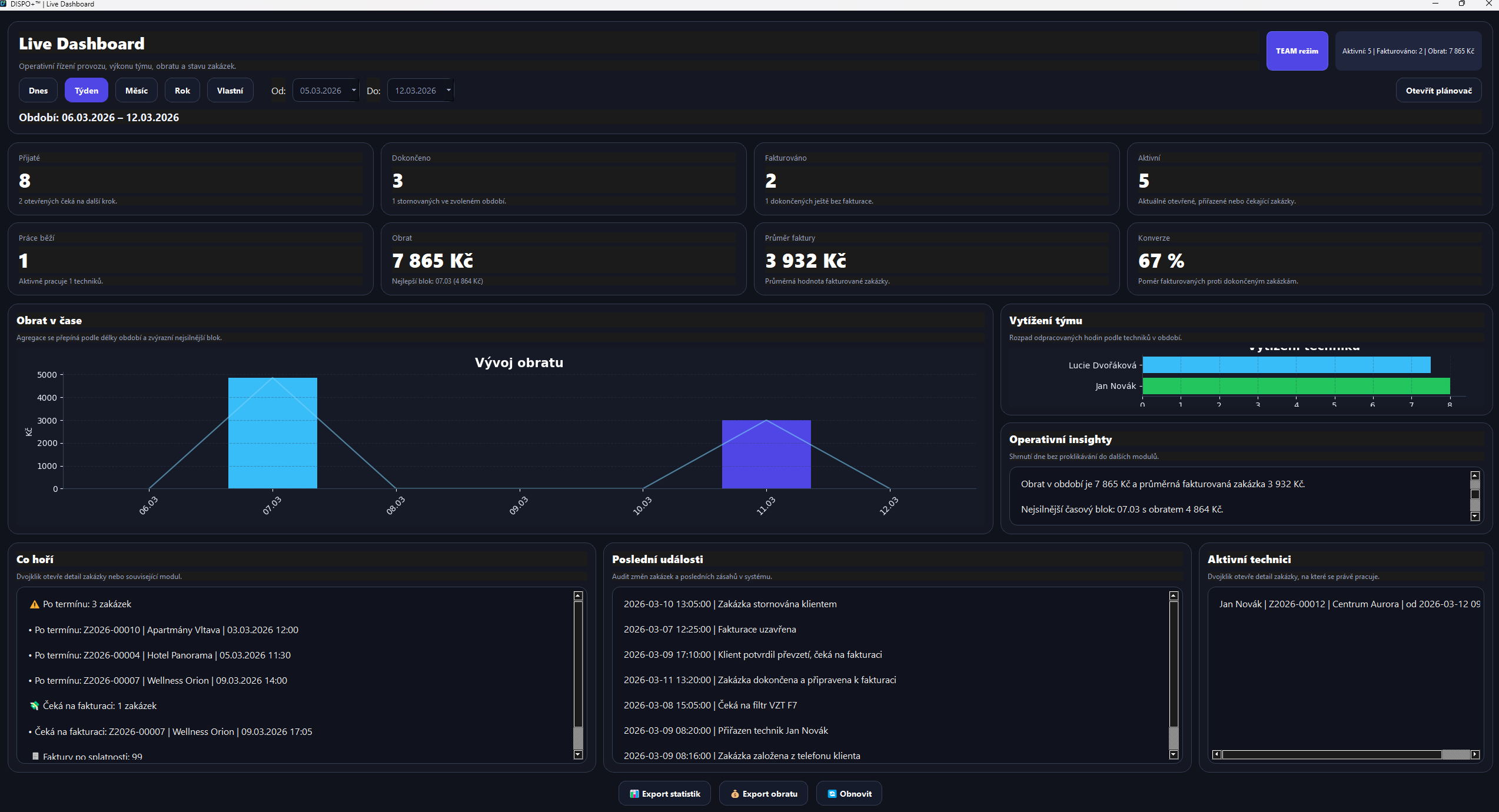
DISPO+ SOLO job overview DISPO+ TEAM live dashboard

DISPO+ 2.0

DISPO+ on the PC and in the field

Jobs, materials, settlements and communication connect the main DISPO, TECHNIK clients and DISPO Mobile. The updates below describe current features; verified installation packages and their availability are listed on the downloads page.

One system for the office and the field

DISPO+ 2.0 connects jobs, technicians, work reports and materials with TECHNIK PC 1.0, TECHNIK Android 1.0 and DISPO Mobil 1.0.

DISPO+ 2.0 and apps for work outside the office

TECHNIK PC 1.0 and TECHNIK Android 1.0 give technicians their assigned jobs and work records. DISPO Mobil 1.0 gives an authorised manager a company overview and a personal work area. All connect to the main DISPO+ 2.0 application.

Czech, English and German throughout the system

Switch language in the desktop apps, both Android apps and the website. The interface, guides and legal documents are translated, and the documents are also available offline in the apps. Your team can use the same system in different languages. Your own notes, messages and material names stay as entered.

Expanded materials catalog and stock module

The materials module connects the catalog, purchase and sale prices, and material use on jobs. Additions include imports, product searches by name or EAN, and pricing information from stores. Materials recorded by technicians on a PC or phone connect with job approval and billing.

Team work reports, earnings and monthly settlements

Technician work connects with a work-report calendar, earning rates, advances and payouts. A monthly overview shows time worked, earnings and the remaining amount, with settlement history retained. The dispatcher has information to review the team, while technicians can see their own work.

Mobile and TECHNIK

Confidence when getting started

Why companies feel confident starting with DISPO+

Try the system in practice first. During the 14-day trial, you can test the actual workflow, assess what makes sense for your business, and only then discuss the right deployment option.

Free 14-day trial

Pay nothing upfront; first test the system in real operations.

No-obligation test

Try the process from jobs and documents through to billing, without buying blindly.

Help choosing a mode

After testing, we will recommend whether SOLO or TEAM is more suitable for you.

DISPO+ 2.0 for Windows

Jobs, planning, teams and billing in one desktop application.

Initial deployment

How initial deployment proceeds

1. Download the Windows trial

Run the installer and prepare your trial environment.

2. Test in practice for 14 days

Test jobs, planning, documents and everyday operations.

3. Assess SOLO or TEAM

We will compare which mode is more suitable for your business in the long term.

4. Agree the next steps

After testing, we will propose suitable settings and licensing options.

Why DISPO+

When spreadsheets, phone calls, email and paper are no longer enough

In service and job-based businesses, chaos is not caused by one poor form. It happens when information is spread across tools that do not share job status, pricing, documentation or responsibility.

DISPO+ brings business processes, operations and documentation into one environment. The result is less re-entry, less lost information and greater confidence about what is in progress, complete or awaiting invoicing.

The job at the centre Customer, address, equipment, work, materials, documents and change history in one place.
Working modules Scheduler, notebooks, email, full-text search, reminders, dashboard, auditing and licensing.
Two modes SOLO for individuals and smaller companies; TEAM for growth, accountability and multiple users.
Room to grow TECHNIK for PC and Android, DISPO Mobile for managers and synchronization with the main DISPO.

Does this sound familiar from everyday work?

The SOLO reality

  • After a full day's work, you still have to find jobs, notes and supporting information.
  • You catch up on invoicing when you are already tired.
  • Your information is scattered across your phone, email, paper and memory.
  • Office work slows you down and feels like a chore.

Does this sound familiar from everyday work?

The TEAM reality

  • Everyone uses a different tool and information gets lost between people.
  • You switch between the phone, spreadsheets, messages and paper.
  • You do some administration manually even though a system could simplify it.
  • Unclear job status increases pressure on dispatchers and management.

What DISPO+ solves

Less chaos, a clearer overview and less manual administration

DISPO+ offers more than modules. It addresses concrete operational results: jobs under control, better work planning and less evening searching for information.

Job details in DISPO+

Job details

Customer, equipment, price list, work, materials, expenses, travel, status and total price in one view.

  • Create a new job quickly
  • Change history and related documents
  • Immediate price totals without manual re-entry
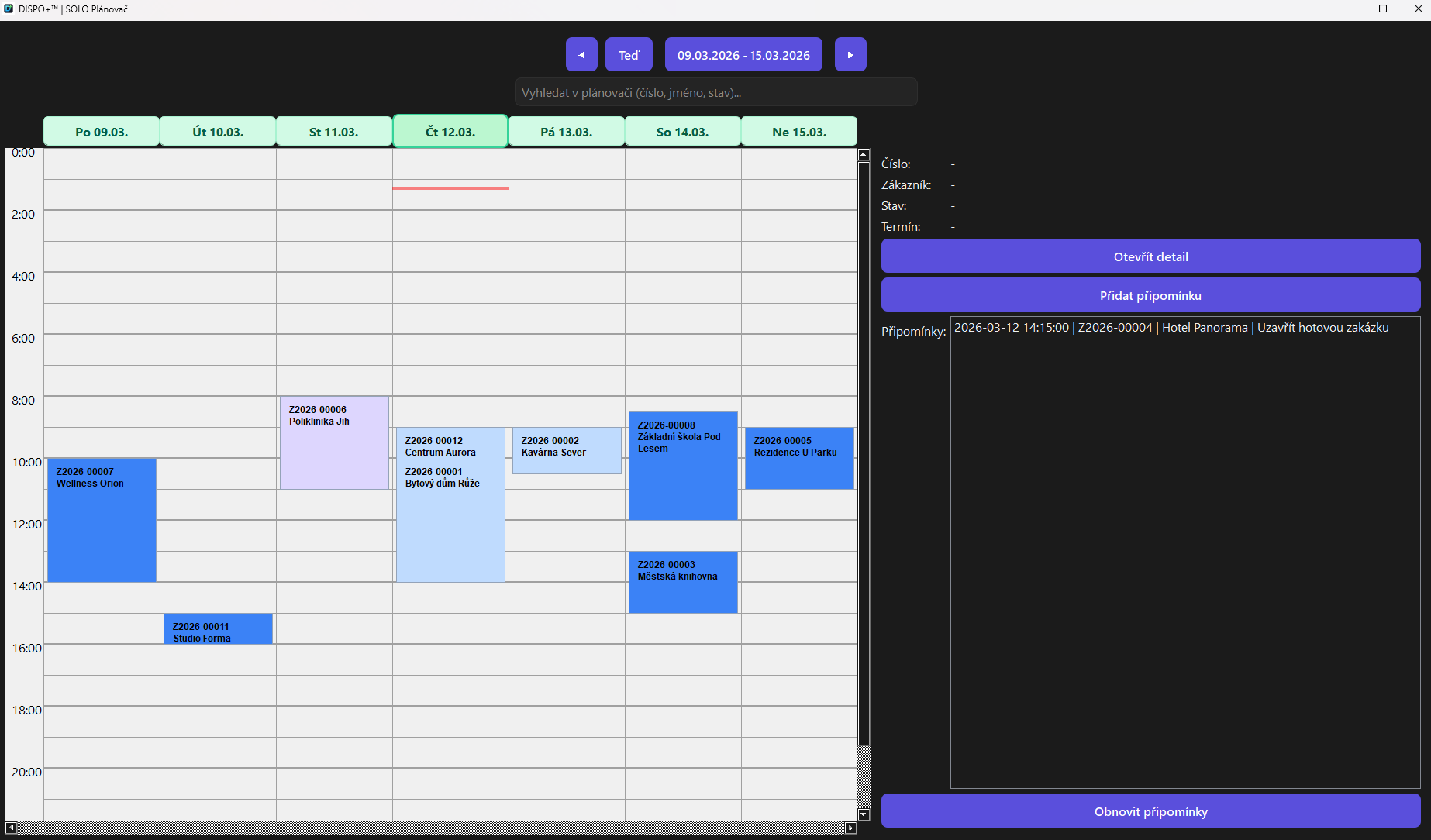
Scheduler in DISPO+

Reminders and deadlines

You do not have to keep important dates in your head. Reminders help prevent things getting lost between jobs.

  • Automatic reminders for important steps
  • Less risk of overlooking something
  • Better coordination with schedules and operations
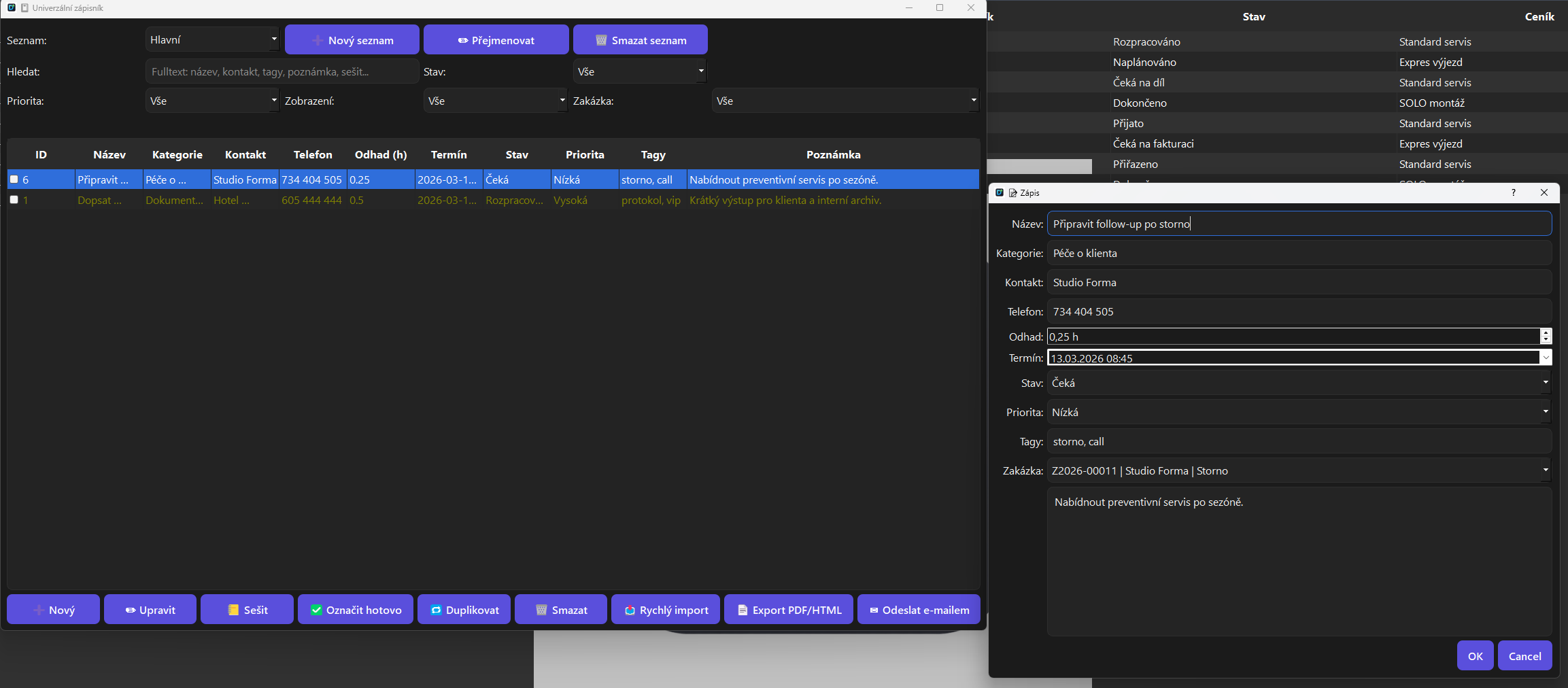
Notebooks in DISPO+

Notebooks

Internal notes, operational records and a quick way to save information that must not get lost between calls and site visits.

  • A separate notebook for operational matters
  • A notes workbook for daily management
  • Linked to search and customer context
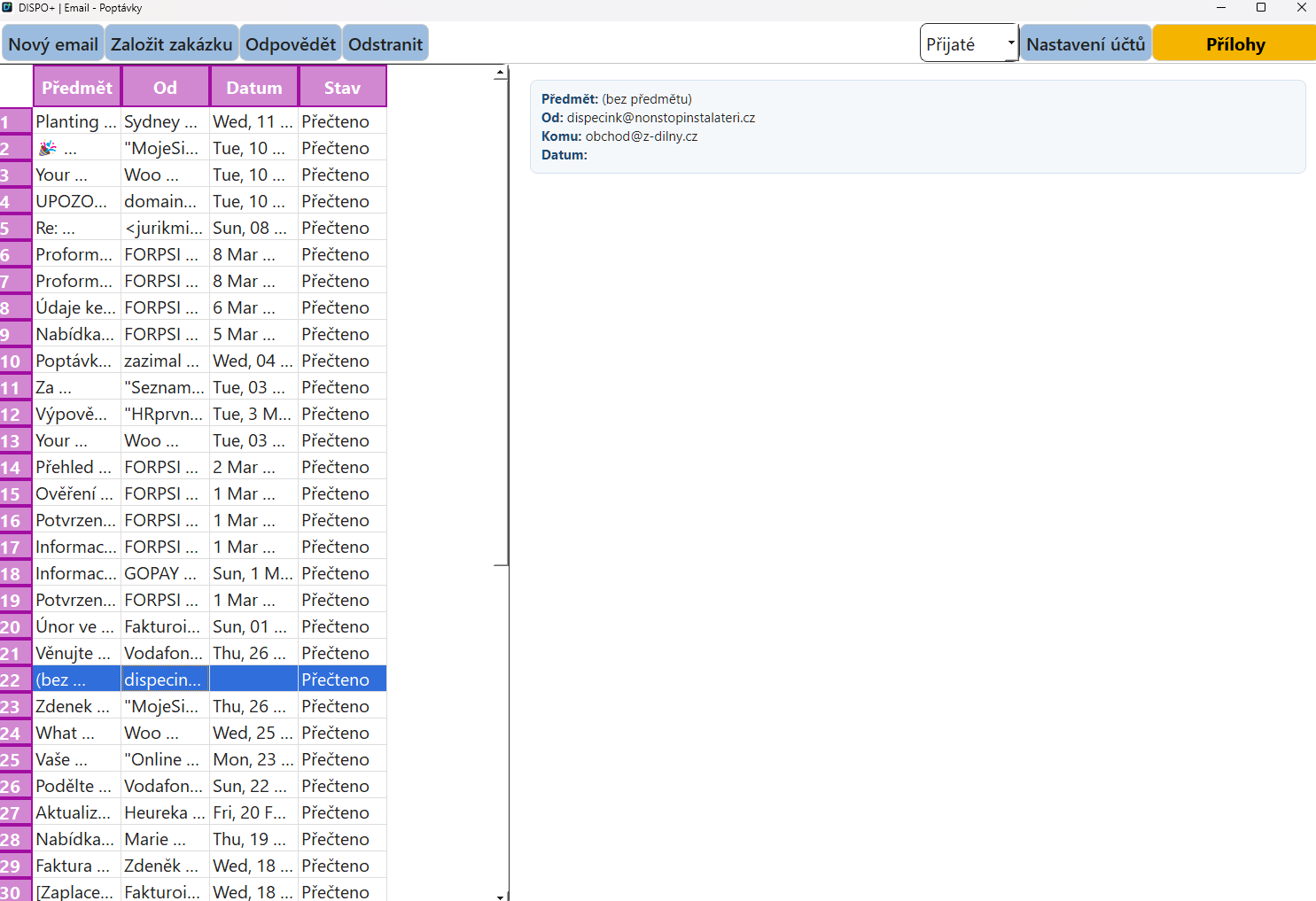
Email in DISPO+

Email without complicated setup

Just enter your email and password. The system takes care of the rest, so you do not have to deal with technical details or manual configuration.

  • A quick start without technical hassle
  • Communication linked to customers and jobs
  • Less switching between tools
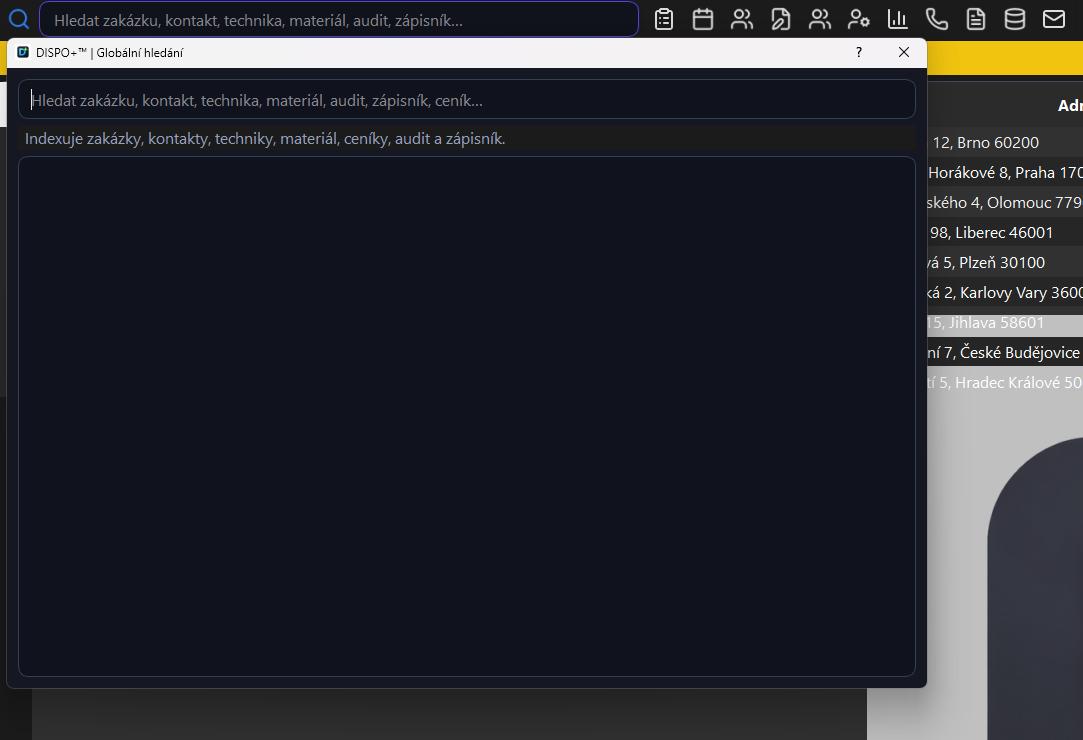
Find information quickly in DISPO+

Quick search without chaos

When you need information, you do not have to search five places. Jobs, customers and history can be found quickly and in context.

  • One search across operations
  • Go straight to the right details
  • Less time spent searching
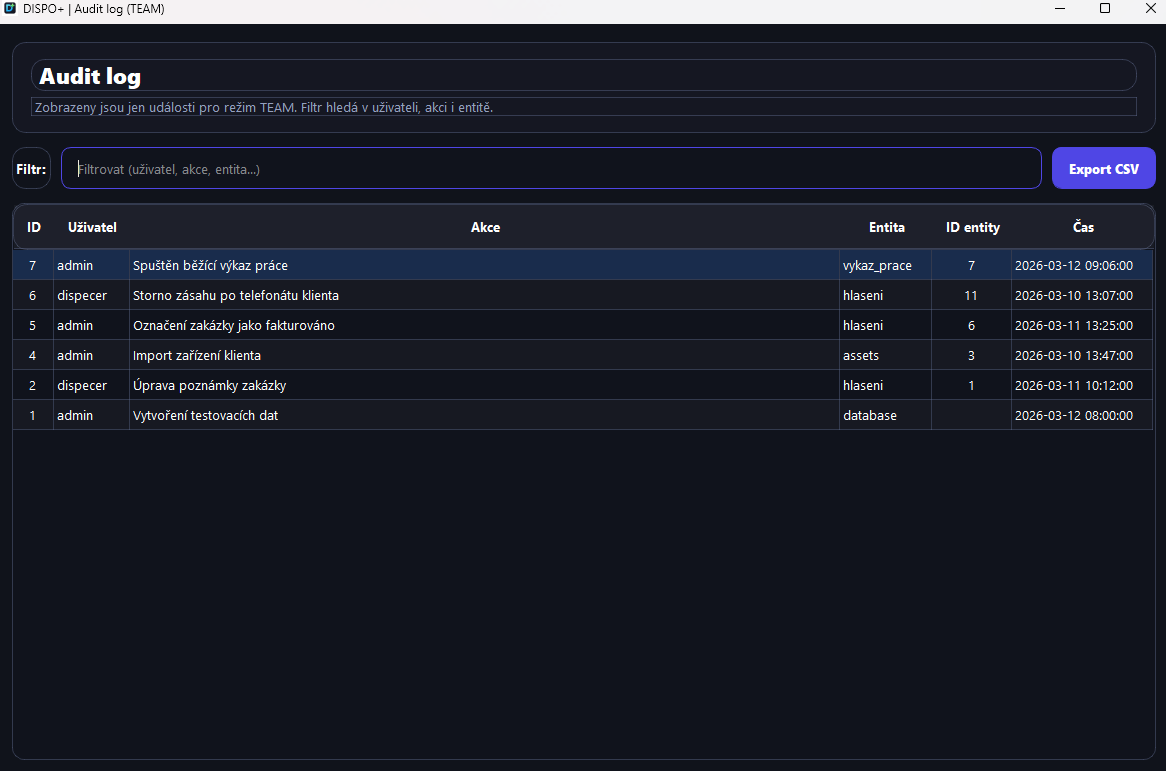
Audit log in DISPO+ TEAM

Auditing, roles and permissions

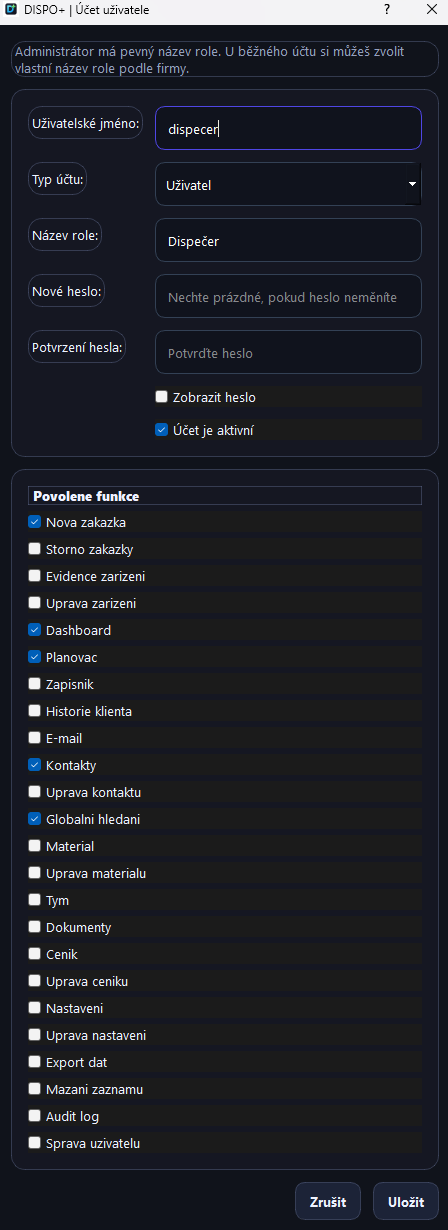
TEAM mode adds users, roles, detailed permissions and audit records for important actions.

  • Administrator, user and custom roles
  • Enable features by module
  • Trace changes and responsibility

What changes in everyday operations

Less manual administration and more confidence that nothing gets missed

Create customer records faster

Retrieving registry information reduces manual copying and speeds up the start of a new job.

Less time searching the history

Equipment, premises and previous interventions are kept together, so you know where to look.

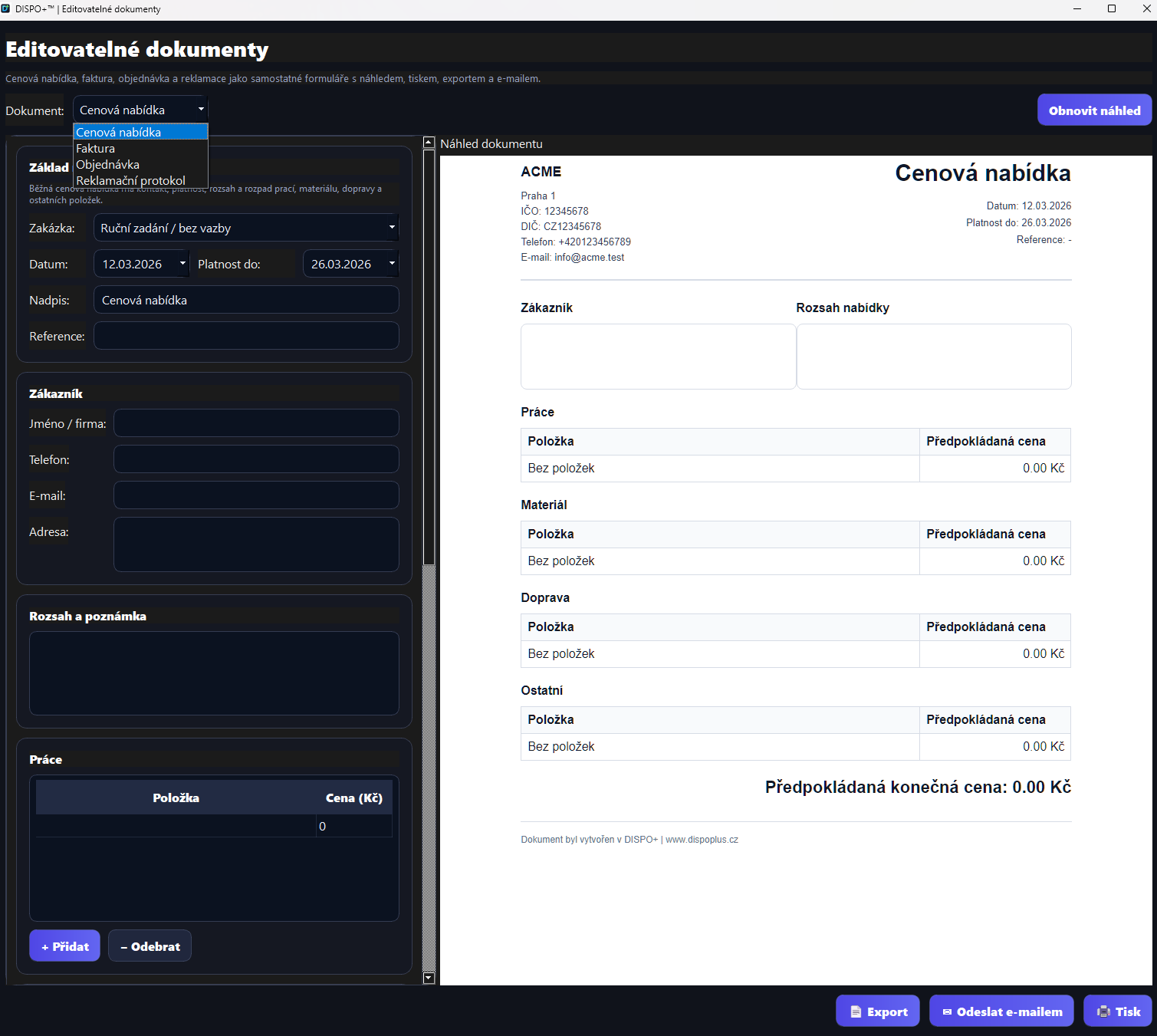
Documents without re-entry

Documents and invoicing use job data, so you do not have to assemble everything manually in the evening.

Peace of mind through backups

Data backup and recovery help protect operations even on busy days full of changes and pressure.

“What needs attention” dashboard

A quick overview of critical jobs, pending steps and operational performance in a live dashboard.

Customer history

Turnover, recent activity, equipment, previous jobs and related communication in one profile.

Price lists and margins

Multiple price lists, surcharges, discounts, VAT, evening and weekend rates, and running calculations.

User accounts

TEAM mode uses active accounts, access according to application mode and separate SOLO/TEAM behaviour.

14-day trial

Try SOLO and TEAM in a single trial mode

The 14-day trial lets customers test both deployment scenarios. Compare individual working speed with team planning, permissions and auditing without arranging two separate trials.

  • SOLO workflow: jobs, price lists, contacts, email, documents and invoicing
  • TEAM workflow: multiple users, dispatching, absences, roles, permissions and audit log
  • One decision after testing: continue with SOLO or move straight to TEAM

SOLO trial

A quick start for individuals

Try job details, documents, price lists, contacts, email and a workflow without scattered tools.

TEAM trial

Team operations management

Test technician schedules, availability, absences, users, permissions and audit oversight in practice.

1 trial / 2 options

Choose based on experience

You do not have to decide upfront. The trial is designed to let you test both operating models safely.

SOLO vs TEAM

Two options, one shared product foundation

The same job and document core, with different levels of operational management. SOLO focuses on speed and simplicity. TEAM adds accountability, capacity planning and traceability.

SOLO: technician, sole trader, small company TEAM: dispatcher, multiple technicians, operations management
Area SOLO TEAM
Jobs, work, materials and documents Yes Yes
14-day trial Included in one trial Included in one trial
Scheduler and reminders For individuals and smaller businesses For multiple people and dispatch coordination
Roles and detailed permissions Basic mode Detailed access management
Audit trail Basic history Audit log for key actions
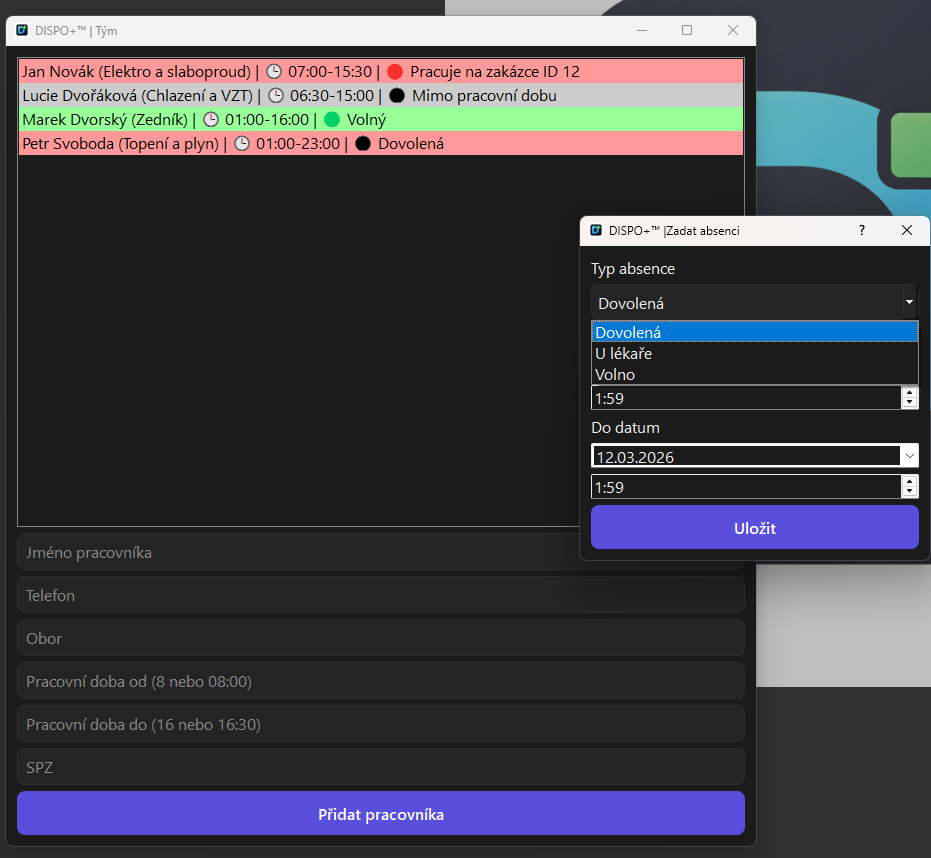
Technician availability and absences Not the primary use case Yes, part of the TEAM workflow

What working in DISPO+ looks like

From job intake to closure, without scattered tools

These are not mock-ups. The real application screens below show how DISPO+ simplifies everyday operations.

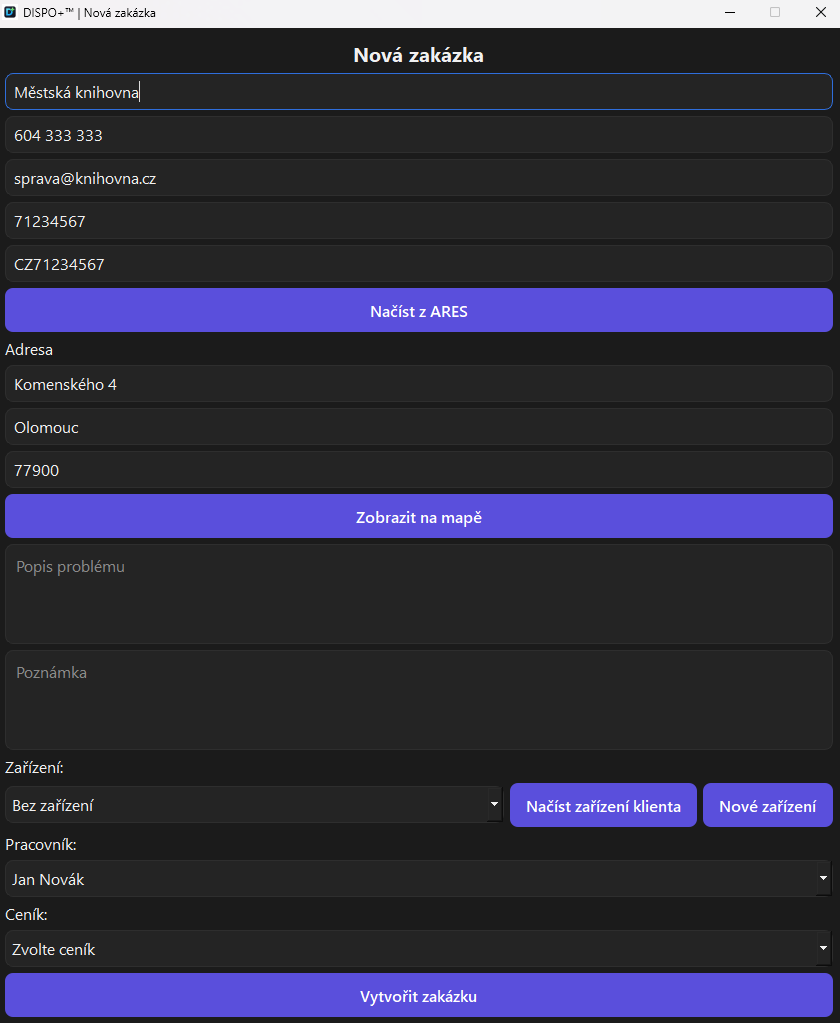
New job in DISPO+ SOLO
New jobCustomer, address, equipment and price list in one entry form.
Notebooks in DISPO+
NotebooksOperational notes and quick internal records.
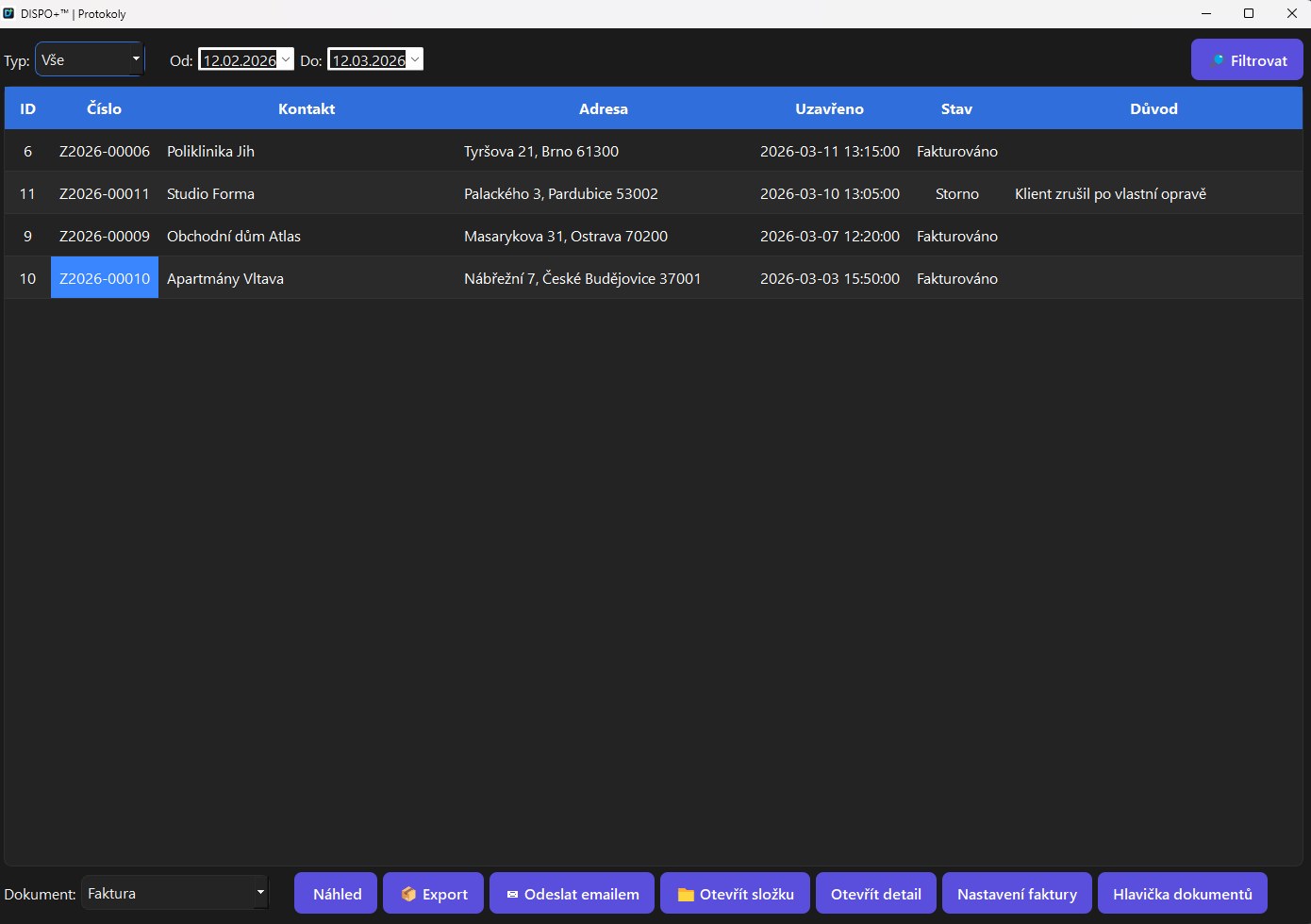
Report archive in DISPO+
Document archiveCompleted jobs, PDF files and links to invoicing outputs.
Technician availability in DISPO+ TEAM
Team availabilityWho is at work, who is available and who is absent.
User permissions in DISPO+ TEAM
Roles and permissionsEach account can be granted access to only the modules it needs.
Global search in DISPO+
Global searchFull-text search with suggestions across modules.

Blog, news and social media

Content to attract visitors and support regular communication

The website includes sections useful for organic traffic and social media. They can communicate product news, practical operational tips, SOLO versus TEAM comparisons and planned enhancements.

  • Blog and news for articles, updates and release notes
  • A comparison page to help visitors decide before purchasing
  • Mobile applications, synchronization and further development
  • Topics suitable for Facebook, Instagram, TikTok and short demonstration videos
News

How DISPO+ speeds up the journey from job intake to invoice

Content suitable for an article or a series of short social posts demonstrating the workflow.

Open hub
Comparison

SOLO versus TEAM: when simplicity is enough and when to move to team mode

A landing page for visitors considering a purchase who need to make a quick decision.

View comparison
Roadmap

Server connectivity, the mobile application and the next steps for DISPO+

A page for communicating future directions and gathering interest in new features.

Explore the roadmap

Operational experience

What companies most often assess when trying DISPO+

  • How quickly a job becomes a document and invoice without entering the same data twice
  • How much a central scheduler improves on a shared spreadsheet
  • When to stay with SOLO and when TEAM makes sense
  • How effectively full-text search, customer history and auditing retrieve information
Working speedA key pilot topic
Job overviewA major decision factor
Documents and invoicingThe most common reason for interest
Team oversightThe main benefit of TEAM

Quick guide

A mini chat to help visitors get started

Hello, are you looking for a quick SOLO workflow or team management with TEAM?

What we are working on

Current DISPO+ development status

Regularly published priorities based on service companies' experience and community suggestions.

Complete

A stronger foundation for enquiries

More accurate form-data collection and clearer links to marketing sources.

In development

A smoother job workflow

A faster transition from enquiry through delivery to billing without losing context.

Under consideration

Expanded outputs and exports

Better management reporting and operational overviews by business type.

Based on feedback

Community priorities

We continually reflect the community's most frequent suggestions in the product roadmap.

Final overview

DISPO+ is for the point when improvisation is no longer enough

Whether you work alone or coordinate a small team, the aim is the same: finally get jobs, planning and related administration under control without unnecessary chaos.

FAQ

Frequently asked questions before deployment

Does the trial include both options, or must they be tested separately?

The trial runs for 14 days and includes both SOLO and TEAM. Customers can test both operating models together and make an informed choice.

Is DISPO+ suitable for a small service business or sole trader?

Yes. SOLO is designed for exactly this situation, combining jobs, contacts, documents, email and invoicing without a heavyweight ERP system.

What does TEAM add compared with SOLO?

Multiple users, detailed permissions, an audit trail, dispatch board, absences, technician availability and greater operational oversight.

What other features does the application include besides jobs and invoices?

Scheduler, notebooks, equipment records, email without complicated setup, quick information retrieval, ARES, reminders, dashboard, backups and auditing.

How do the mobile apps work and who uses them?

TECHNIK and DISPO Mobile clients are part of the system. TECHNIK shows personally assigned work; DISPO Mobile provides manager and personal work views. Entries synchronize with the main DISPO. A customer portal and further integrations remain separate planned extensions.

Which app is for a technician and which is for a manager?

TECHNIK PC and TECHNIK Android show assigned jobs and a technician’s personal work. DISPO Mobil includes a broader manager overview and a personal work area. Role-based access is approved in the main DISPO application.

How does work recorded on a phone reach the office?

After pairing, work records synchronise with the main DISPO application. The dispatcher reviews and approves work reports, materials and financial proposals from technicians there. Communication stays linked to the job.

Can the team use different languages?

Yes. The interface, guides and legal documents are available in Czech, English and German in the desktop apps, both Android apps and the website. Entered names, your own notes and material names are not translated automatically.

Contact and enquiries

Would you like a deployment proposal or trial access straight away?

Send us a brief description of your business, number of people and types of jobs. We will recommend suitable options, modules and an approach to testing or production deployment.

  • A 14-day trial with SOLO and TEAM together
  • Mode recommendations based on the size of your business
  • An option to build on your existing price lists, documents and working methods
Trial SOLO TEAM Roadmap